Sprint 3 Personal Blog
Sprint 3 Personal Blog
MCQ Corrections and Mistakes
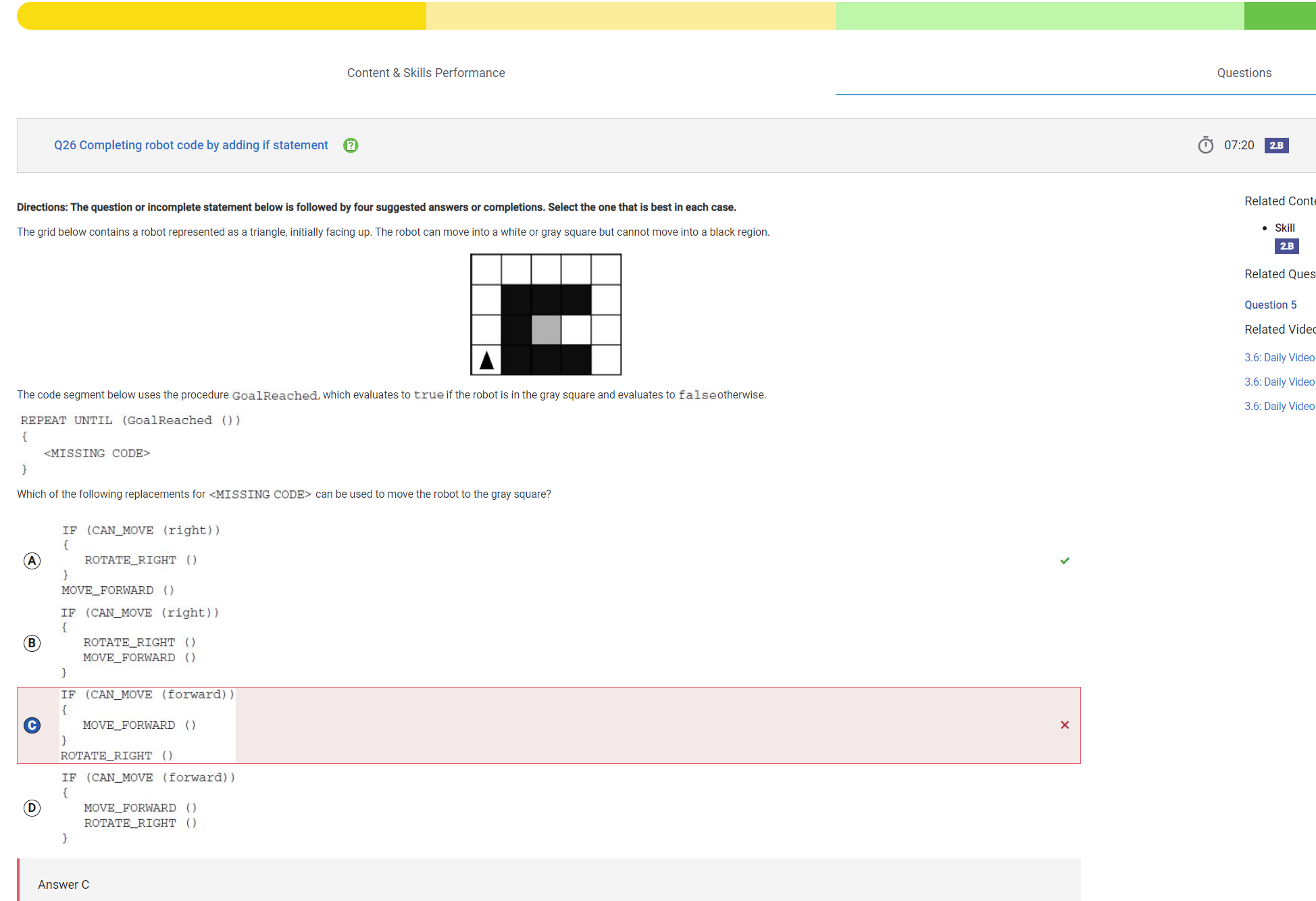
Overall, this MCQ went well for me. I got a 65/66 in 01:39:36. I feel that this was a good accomplishment because I spent an ample amount of time on each problem and spent my time well. This question was based on the topic of algorithms and conditionals and is shown below. In the quiz, I learned a lot about different ways to write algorithms and much more such as encryption.
Why I Got This Question Wrong
In this problem, I had to complete the <MISSING CODE> section of a robot’s program to ensure it successfully moved to the gray square in the grid. First, heres what I understood in the problem:
Understanding the Problem
Key Details:
- Robot Behavior:
- The robot starts in the bottom-left corner of the grid, initially facing up.
- It can move into white or gray squares but must avoid all other regions.
- Objective:
- The robot needs to move to the gray square
- Code Structure:
- The code uses the
GoalReached()procedure, which returnstruewhen the robot is in the gray square. - A loop (
REPEAT UNTIL (GoalReached())) makes sure the robot continues trying until it reaches the gray square.
- The code uses the
My Answer (C): Why It Was Incorrect
I selected the following code for <MISSING CODE>:
IF (CAN_MOVE (forward))
{
` MOVE_FORWARD ()
}
ROTATE_RIGHT ()`
How It Works:
- The robot first checks if it can move forward. If yes, it moves forward.
- Regardless of whether it moves forward or not, the robot then rotates right.
Why It Failed:
- Unnecessary Rotations:
- The robot rotates right even when it doesn’t need to.
- Inefficient Navigation:
- The logic doesn’t properly change the robot’s direction based on its surroundings
Correct Answer: A
The correct code is:
IF (CAN_MOVE (right))
{
` ROTATE_RIGHT ()
}
MOVE_FORWARD ()`
How It Works:
- The robot checks if it can move to the right. If yes, it rotates to face the right direction.
- Once it’s facing the correct direction, it moves forward.
How Can I Improve?
Key Mistake:
- I overlooked the importance of the order in directional logic. The robot needed to adjust its orientation only when necessary (using ROTATE_RIGHT), not rotate after each step.
Understanding Directional Logic:
Focus on how conditionals like IF and CAN_MOVE are used to check the robot’s surroundings and guide its movement.
- Learn Conditional Logic: I can review IF, ELSE IF, and ELSE statements and how they can be used to make decisions in programming.
- Practice Robot Movement Problems: I can also use interactive platforms like Code.org or Scratch to practice programming robot movements and look for puzzles or exercises involving navigation and loops so that I can be prepared for the AP exam.
- Simulate and Debug: Break down the robot’s position step by step and analyze if the code behaves as expected.
Specific Numbers and Requirements
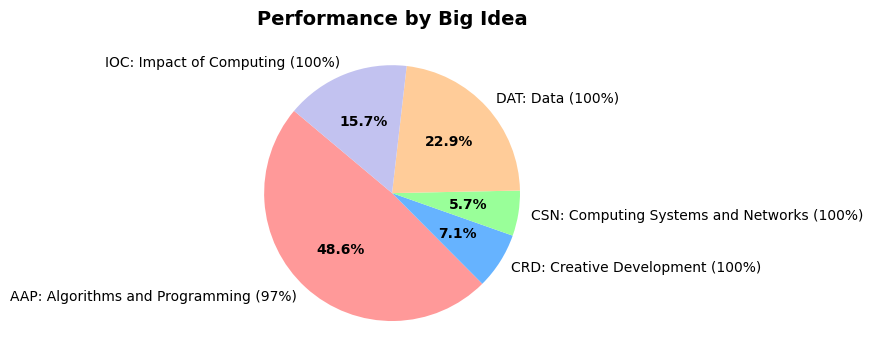
| Skill | Number of Questions | Average Performance % |
|---|---|---|
| Skill 1.A: Investigate the situation, context, or task. | 1 | 100% |
| Skill 1.B: Determine and design an appropriate method or approach. | 1 | 100% |
| Skill 1.C: Explain how collaboration affects the development of a solution. | 2 | 100% |
| Skill 1.D: Evaluate solution options. | 13 | 100% |
| Skill 2.A: Represent algorithmic processes without using a programming language. | 0 | NA |
| Skill 2.B: Implement and apply an algorithm. | 11 | 91% |
| Skill 3.A: Generalize data sources through variables. | 1 | 100% |
| Skill 3.B: Use abstraction to manage complexity in a program. | 4 | 100% |
| Skill 3.C: Explain how abstraction manages complexity. | 4 | 100% |
| Skill 4.A: Explain how a code segment or program functions. | 0 | NA |
| Skill 4.B: Determine the result of code segments. | 6 | 100% |
| Skill 4.C: Identify and correct errors in algorithms and programs. | 4 | 100% |
| Skill 5.A: Explain how computing systems work. | 3 | 100% |
| Skill 5.B: Explain how knowledge can be generated from data. | 7 | 100% |
| Skill 5.C: Describe the impact of a computing innovation. | 4 | 100% |
| Skill 5.D: Describe the impact of gathering data. | 1 | 100% |
| Skill 5.E: Evaluate the use of computing based on legal and ethical factors. | 4 | 100% |
My Biggest Accomplishment for Sprint 3: Creating a Voting API
One of my highlights during sprint 3 was designing and implementing a working API for managing votes on our chatroom’s posts. This API handles upvotes, downvotes, and helps the backend retrieve detailed voting data for posts.
Features of the API
- Vote Creation and Updating:
- Users can upvote or downvote a specific post.
- If a vote already exists for the user and post, the vote type is updated instead of creating a duplicate.
- Vote Deletion:
- Users can remove their vote from a post.
- Retrieving Data:
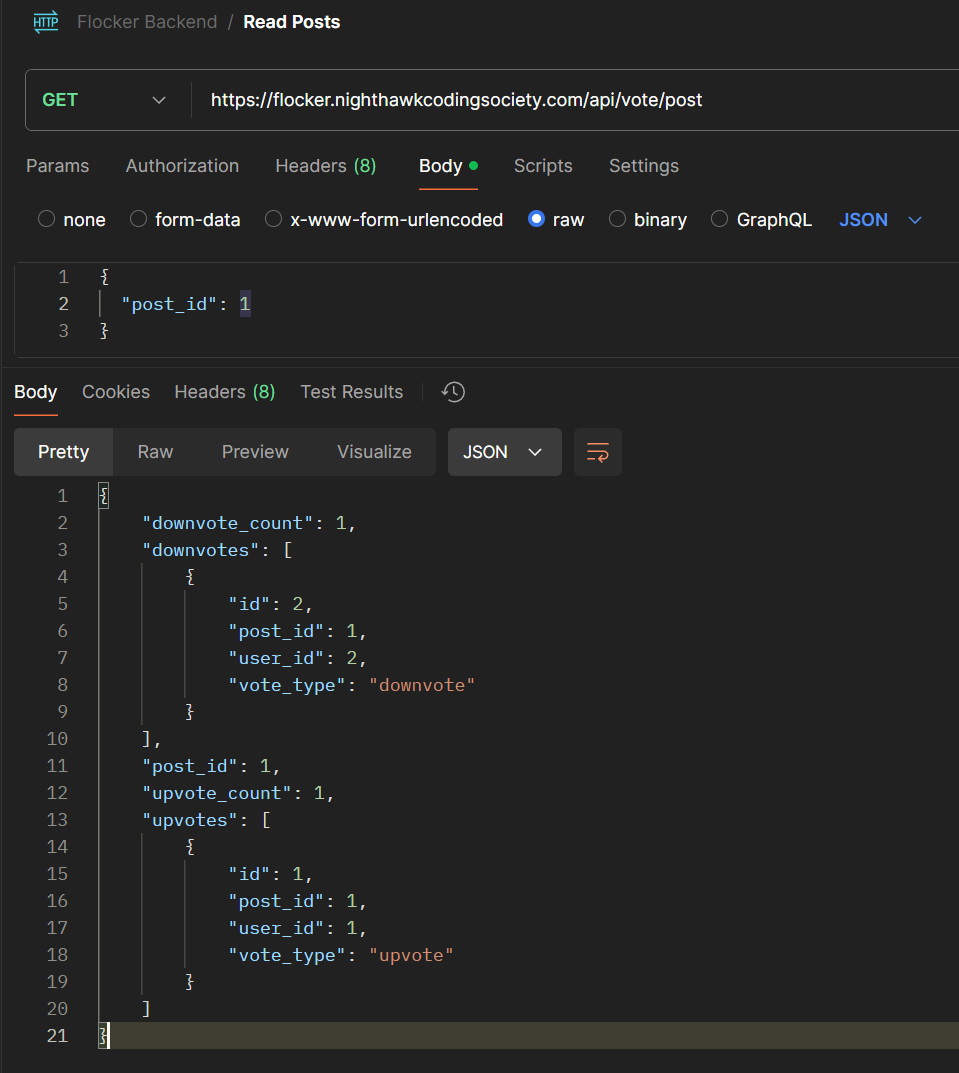
- The API provides stuff including (also depicted in the picture below):
- The number of upvotes and downvotes.
- Details of each individual upvote or downvote.
- The API provides stuff including (also depicted in the picture below):
Code Overview
Here’s the main logic of my API:
Endpoints
- POST /vote:
- Creates or updates a vote for a specific post.
- Example:
{
    "post_id": 1,
    "vote_type": "upvote"
}
- DELETE /vote:
- Removes a user’s vote from a post.
- GET /vote/post:
- Retrieves all votes for a post
Overall, creating this API helped me greatly with my understanding of backend structure and APIs in general.
Evidence that it is my work
- https://github.com/nighthawkcoders/flocker_backend/commit/31999daa85f5c85f1668e037a648908292d89bb2